Model
Fast, Quality or Max: Pick Your Model
Fast is the quickest and lowest cost, Quality is the default with richer detail and steadier motion, and Max is the most cinematic with the best sound. Every card shows its cost before you tap.
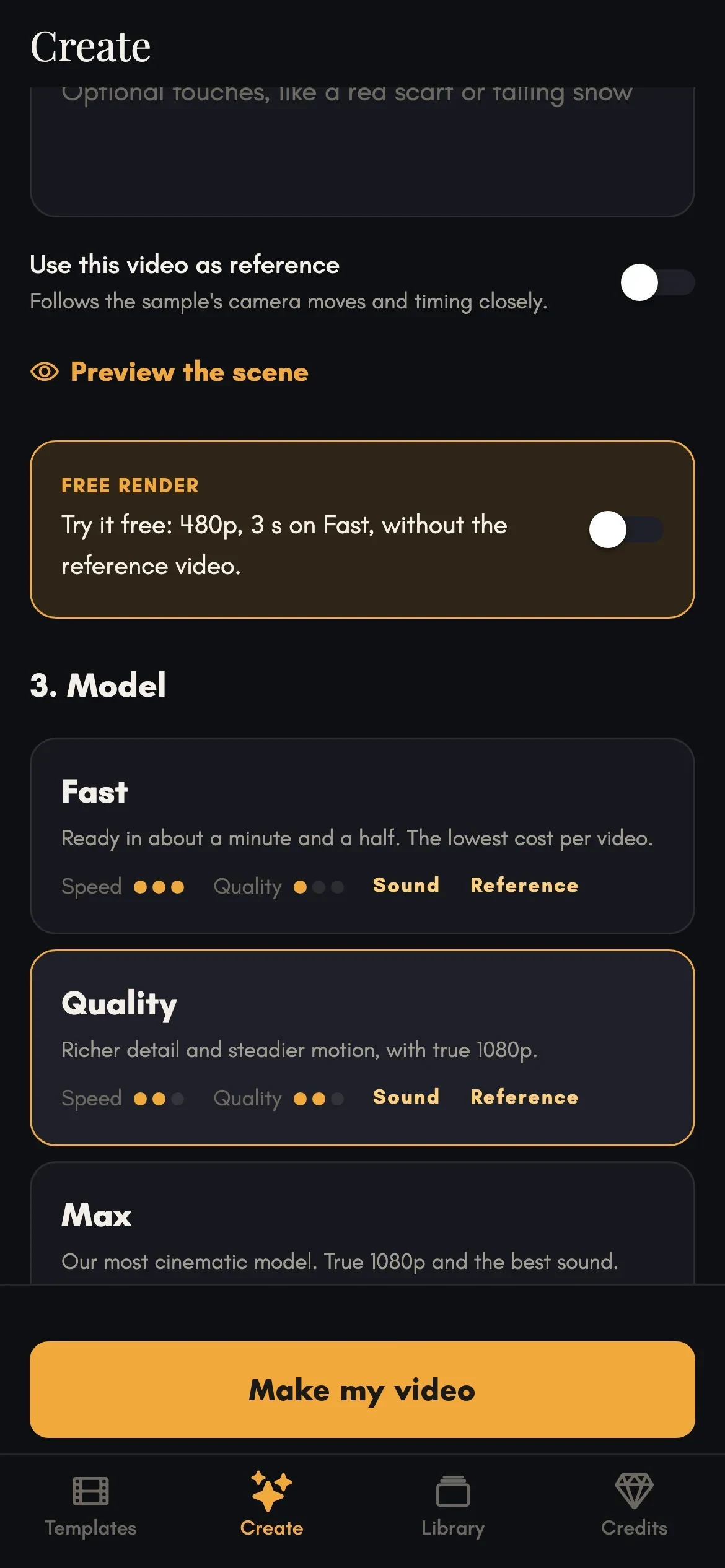
The Model is the choice on the Create tab between speed, cost and finish. There are three: Fast, the quickest and the lowest cost per video, “Ready in about a minute and a half”; Quality, the default, with richer detail and steadier motion; and Max, the most cinematic, with the best sound, which takes the longest.
Each card shows its credit cost for your current settings before you tap, and free videos are made on Fast. The rest of this page is how to choose.
Three Models, one scale
Section “3. Model” on the Create tab gives you three cards. They sit on a single line that runs from quick to cinematic. Each card shows how it rates on speed and on quality, and what it costs for the settings you have chosen right now.
Fast
“Ready in about a minute and a half. The lowest cost per video.”
Fast is your sketchbook. Use it to test a new idea, check how a photo carries a scene, or try three versions of a sentence before you commit. It is the Model your free videos use.
Quality
“Richer detail and steadier motion, with true 1080p.”
Quality is the everyday choice, and it is where vidmi starts you, on the Create tab and on every template. Compared with Fast, expect richer detail and steadier motion.
Max
“Our most cinematic model. True 1080p and the best sound.”
Max is for the film you want to keep. It brings the most detail, the most cinematic look and the richest sound of the three, and it takes the longest. The samples for Grandpa at the Front, Smoky Jazz Bar and Walking on the Moon were made with Max, so a Quality film will not look exactly like them.
The same scene on Fast, Quality and Max
Take one photo and one sentence, such as the app’s own example, and make it once on each Model:
- “me walking on the Moon”
Here is what to expect from each.
- On Fast, you find out quickly whether the idea works: the face, the scene and the wording. It is the answer to “does this work?”, not the final cut.
- On Quality, the same idea comes back with richer detail and steadier motion.
- On Max, it comes back with the most detail, the most cinematic look and the best sound of the three, after the longest wait.
Same photo. Same words. What changes with the Model is the detail, the motion, the sound and the wait. The three films are made separately, so the shot itself can differ from one to the next.
Pick by what the video is for
| What you are making | Model | Why |
|---|---|---|
| Testing an idea or a new photo | Fast | You learn quickly whether the face, the scene and the wording work. |
| A post for Stories, Reels or TikTok | Quality | Steadier motion and richer detail hold up on a phone screen, without the longest wait. |
| A keepsake you will watch for years | Max | The most cinematic look and the best sound, for the film you plan to keep. |
| Playing on a TV or a big screen | Max or Quality, at 1080p | A large screen shows every soft edge. Pair it with “16:9 YouTube, TV” and 1080p. |
| A group chat reaction | Fast or Quality | It gets watched once, laughed at and forwarded. Speed matters more than polish. |
If none of these fits, start on Quality. It is the default for a reason. For the sharpness side of the choice, see resolution, and for the shape, aspect ratios.
When Max is worth the wait
Max takes the longest, and it is not always the right call. It earns its place when:
- The film is for someone. A grandfather in a trench at dawn, made for a family gathering, deserves the most detail you can give it.
- Sound carries the moment. A smoky jazz bar or a crowd on a main street sounds richest on Max. Every Model can add voices and scene sounds, and voices and sounds explains the three choices.
- It will be seen big. A TV, a projector, a slideshow at a memorial.
For everyday sharing, Quality is usually all you need. For a first try, Fast is enough.
What the Model means for credits
Every Model is paid in credits, and each card shows its cost before you tap. Fast always costs the least. Your length, resolution and the reference switch change the number too, so the cards update as you adjust the “Format” section.
The main button repeats the final cost, “Make my video · N credits”, so there are no surprises. If a video fails, those credits return to your balance on their own. See credits for how buying works, and save credits for ways to spend less.
What the Model means for wait time
Fast is ready in about a minute and a half. Quality and Max take longer, and so do 1080p and lengths of 7 or 10 seconds. The progress screen gives you an estimate as it films, “Usually 1 to 3 minutes” for a short Fast video. For more, see how long a video takes.
You never have to watch it. “You can leave this screen. We’ll notify you when your video is ready.” Start another while you wait: you can have up to three videos in progress at once.
Draft on Fast, finish on Quality or Max
The smartest way to use the three Models is to use two of them.
- Draft on Fast. Keep the length short and the resolution low. Try your photo with the scene and see what you get.
- Adjust. Change a word in your scene, add a touch like “falling snow”, or try a different photo. Run Fast again until the film looks right.
- Finish on Quality or Max. Switch the Model, raise the resolution, pick your length, and make the final cut. Tap “Make another” to start from the same scene.
A draft answers the questions that matter most: does the face read well, does the scene feel right, does the moment land. Once those are settled, the final film is about polish, and polish is what Quality and Max do best.
Nothing to spend yet? Try it free on Fast first. Or see how the whole flow fits together in the AI video generator overview.
Questions
Which Model does vidmi pick for me?
Quality. It is the default on the Create screen and on every template. Tap Fast or Max to switch before you make your video.
Which Model are free videos made on?
Fast. The app's line is "Try it free: 480p, 3 s on Fast", so you can see your face in a scene before you spend anything.
Do all three Models make sound and follow a reference video?
Yes. Every Model can add voices and scene sounds, and every Model can follow a template's sample when you turn on "Use this video as reference". Max gives you the best sound.
What if a video doesn't come out?
Your credits come back to your balance automatically, whichever Model you chose.