Photo to Video AI, Free to Try on Your iPhone
Yes, photo to video AI can be free to try. vidmi is an iPhone app, coming soon. Add one photo of a face, pick a scene and make a short video, with no account and nothing to buy first.
Try it free. No account needed.
- Photo to video, free to try
- Yes. vidmi is coming soon to iPhone and free to try: add one photo of a face, pick a scene and make a video with no account and no purchase. A free video is 480p, 3 seconds, on the Fast model, and carries the small vidmi mark. After that you buy credits in the app, with no subscription.
How it works.
-
Get the app once it is out, with no sign-up
vidmi is coming soon to iPhone. Once it is out, open it. There is no account to create and nothing to buy before you start.
-
Add a face photo and pick a scene
On the Create tab, tap "Gallery" or "Camera" and add one clear face. Then pick a ready-made scene on the Templates tab, or describe your own in a sentence.
-
Tap "Make my free video"
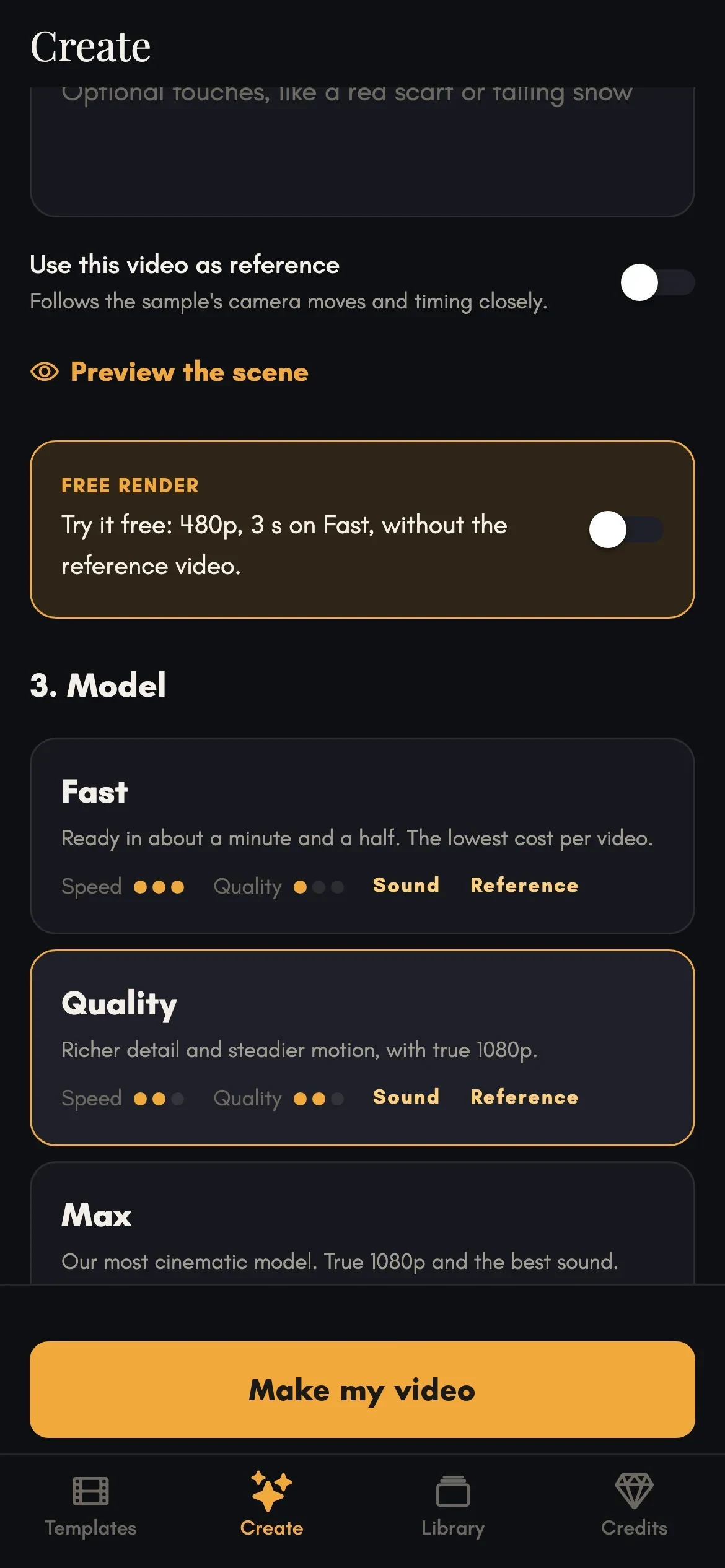
New to vidmi, you start on the free video automatically, and the main button reads "Make my free video". You get a 3-second film at 480p on Fast. The app says a short Fast video is "Usually 1 to 3 minutes".
Prompts to copy.
Copy one, open vidmi and paste it into “Describe your scene” on the Create tab. If a scene is already chosen there, tap “Write my own instead” first. Then add a photo.
- 01
One stone, one river
Me on a pebble riverbank at sunset, skipping a flat stone across the slow water and watching the rings spread, orange light on the far bank.
What free to try covers
vidmi is coming soon to iPhone, and it is free to try. You add one photo of a face, pick a scene and get a short video starring that face, with no account, no sign-up and nothing to buy first.
A free video is 480p, 3 seconds, on the Fast model, with no reference video. It carries the same small vidmi mark as every video. After the free try, you buy credits in the app: one-time purchases, no subscription.
Call it photo to video, image to video or picture to video. Here it means one still photo of a face in, one short film out. It is the whole photo to video flow at its smallest size, and it makes a new scene with that face in it. The picture itself does not start to move.
The one condition is on the image itself: it has to be a photo with one face in it.
What a free video looks like: 480p, 3 seconds, Fast
The app puts it in one line: “Try it free: 480p, 3 s on Fast.”
- 3 seconds. Enough for one clear moment: a glance up, a step forward, a smile.
- 480p. The lowest of the three resolutions. 720p and 1080p come with credits.
- Fast. The quickest of the three models.
- Any scene. Pick one of the ready-made scenes or write your own scene.
- Your shape and sound. 9:16 for Stories, Reels and TikTok, 16:9 for YouTube, 1:1 for the feed. “Voices + sounds”, “Sounds only” or “Silent”.
A free video is shorter and lighter than the sample films on the scene cards. Every sample runs 5 seconds, and some were made on Max. Judge the free one on the face and the scene, not on fine detail.
If you are new and have no credits, vidmi starts you on the free video automatically. The finished film lands in your Library, marked “free”. Open it, and “Share” and “Save to Photos” are right there.
Make the free video count
A free video is short, so settle three things before you tap.
The photo
Everything starts from the photo, so choose it first. The app’s own tip: “One clear face, looking at the camera, good light. No sunglasses or group shots.” A well-lit selfie by a window is a safer pick than a dim party shot. If you are choosing among a few, the guide on how to choose the best photo has a five-point check.
The place
Three seconds leave no room for a story, so let the setting carry it. Among the ready-made scenes, Walking on the Moon has the Earth above the horizon, Samurai Street at Dusk has lanterns coming on, and Deep-Sea Explorer has something glowing in the dark water.
The one action
If you write your own scene, give it one person, one place and one action. The prompt on this page is built that way: a riverbank at sunset, a flat stone, one throw. Tap “Preview the scene” to read what the film will show before you make it.
After the free try: credits, no subscription
When you want more, you buy credits in the app, through Apple’s in-app purchase. They are one-time purchases. Nothing renews.
Every paid video shows its cost on the main button before you tap. With credits you can choose Quality or Max, make a film of 5, 7 or 10 seconds, go up to 720p or 1080p, and turn on “Use this video as reference” on a ready-made scene. If a paid video fails, its credits come back automatically.
Read how credits work, or see pricing.
What is not free
Plainly, so nothing surprises you later:
- More than the free try. The free try has an end. When you reach it, the main button reads “Get credits · N needed”.
- Bigger videos. Longer, sharper, Quality or Max, or with the reference switch on: all of these use credits.
- A video with no mark on it. That is not offered, free or paid. The vidmi mark is on every video.
- Anything off the iPhone. vidmi is coming soon to iPhone, with Android after that, and there is no version that runs in a browser.
Ready to see your face in a scene? vidmi is coming soon to iPhone.
Questions
Does the image have to be a photo of a face?
Yes. vidmi starts from one photo with one face in it, and the Create tab asks for exactly that with "Add a face photo". A landscape, a logo or a product shot is the wrong starting point.
Will my photo itself start to move?
No. vidmi makes a new scene starring the face in your photo. The picture you added stays a still.
What are the limits on a free video?
The app says it in one line. "Try it free: 480p, 3 s on Fast." The reference video is not available on a free video. You still choose the scene, the shape and the sound.
Do I need an account or a purchase to try it?
No. vidmi has no account and no sign-up, and a free video needs no purchase. Once the app is out, add a photo and make your film.
What if my free video does not come out?
You get it back. The app tells you "Your free render is back." and you can try again with a different photo or idea.
Can I try it free on Android or in a browser?
Not yet. vidmi is coming soon to iPhone, and Android after that.