Resolution
Which Video Resolution to Pick for Phone, TV or Keepsake
For Instagram Reels, TikTok and group chats, 720p is the best everyday resolution. Pick 1080p for a TV or a keepsake, and 480p to test an idea.
Start with the screen, not the setting
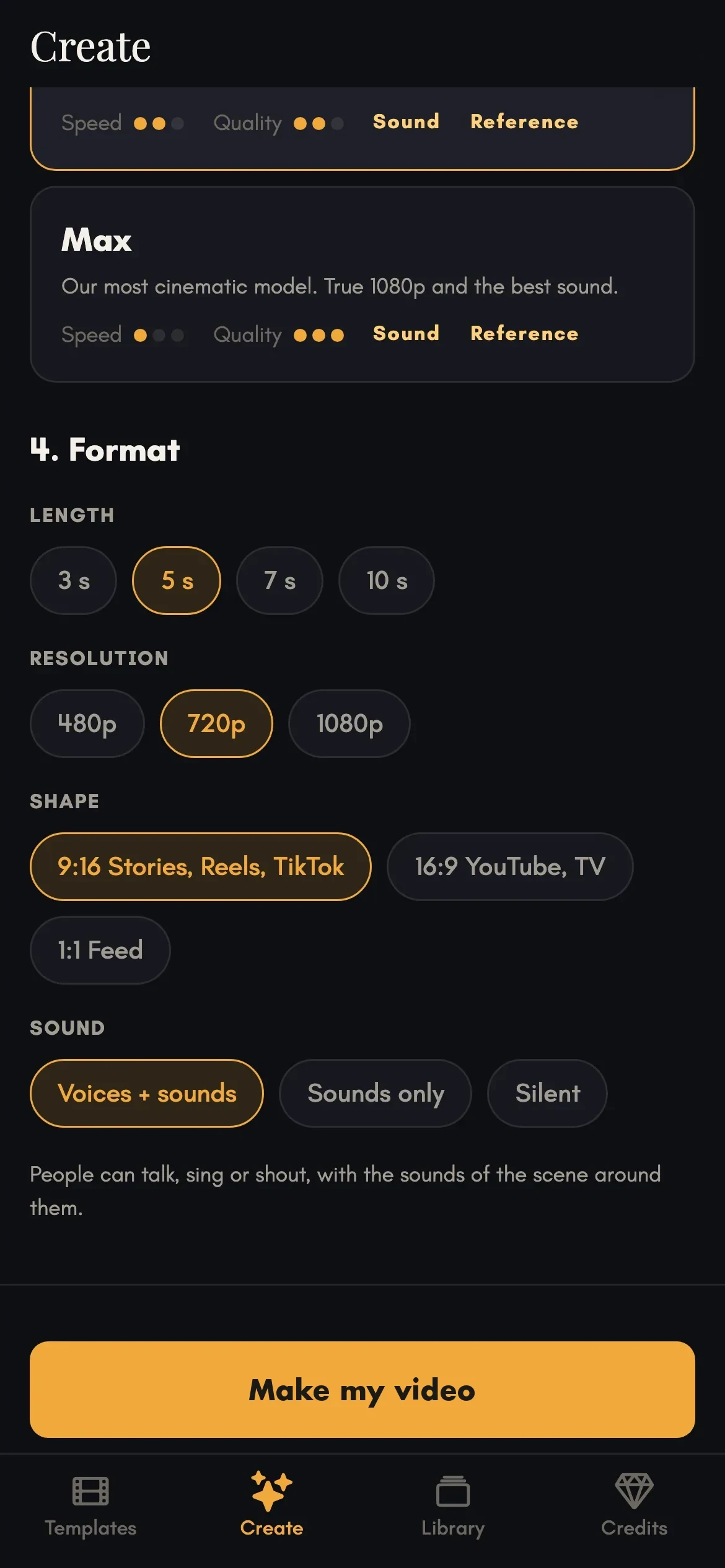
You will find “Resolution” in the “4. Format” section of the Create tab, next to Length, Shape and Sound. It offers 480p, 720p and 1080p. The default is 720p.
Higher is sharper. It also takes longer to make, and the main button shows what it costs before you tap. So the best resolution for Instagram Reels, or anywhere else, depends on one question: where will people watch this? 1080p is the highest vidmi makes.
On a phone, in a feed
Pick 720p. For Instagram Reels and TikTok, 720p is a sensible everyday choice on a phone screen, and it is the default. Set the shape too: see the right shape for each platform. A lower resolution is made sooner than 1080p, so you can try a second idea while the first is fresh.
Choose 1080p when detail is the point, such as a close shot where the face fills the frame. If people will pause and look closely, give them more to see.
In a group chat
Sending your film straight to the family thread? Messaging apps often compress videos on the way, which softens fine detail no matter what you started with.
Pick 720p. The extra sharpness of 1080p can be lost in transit anyway. Save 1080p for the version you keep.
On a TV or laptop
A big screen shows everything. Faces get larger, edges get closer, and any softness becomes visible from the couch.
Pick 1080p. Then match it with the right shape. A vertical 9:16 film can play with bars on either side on a TV. If you plan the evening around the big screen, choose “16:9 YouTube, TV” under Shape, so the scene fills the frame. For playing it from your iPhone, see Play on TV with AirPlay.
As a keepsake
Some films are not for the feed. Your mom on a Paris café terrace in the 1920s. A birthday film you will want to watch again in ten years.
Pick 1080p. Make it once at the top setting and save it to Photos. The Library lists only your 100 most recent videos, so Photos is where a keepsake belongs.
When 480p makes sense
480p is the sketchbook. Use it to test a new idea, a fresh touch on a template, or a scene you wrote yourself. It is also what your free videos use. If the idea works at 480p, make it again at a higher setting.
Resolution and model are separate choices
The model is a separate card on the Create tab. Quality brings “Richer detail and steadier motion, with true 1080p”, and Max is “Our most cinematic model. True 1080p and the best sound.” A rule of thumb:
- Trying ideas: Fast at 480p or 720p.
- Posting to your feed: Quality at 720p.
- Big screen or keepsake: Quality or Max at 1080p.
For the full comparison, read Fast, Quality or Max.
Try it
Open Walking on the Moon, add a clear photo of your face, and make it at 720p for your feed. If it is a film you want to keep, make it again at 1080p and save that one to Photos.
If a finished film looks softer than you hoped, this help article walks through what to check. For everything the setting does, see Resolution. Sending it to family? Read Share to WhatsApp. Posting a Reel? See sharing to Instagram Reels.
Questions
Which resolution does my free video use?
Free videos are made at 480p, 3 seconds, on Fast. It is a way to try an idea. If you like it, make it again with credits at 720p or 1080p.
Is there anything above 1080p?
No. 1080p is the highest resolution vidmi makes.
Why does my film look softer after I send it?
Many messaging apps shrink videos to send them faster. The video in your Library is the one vidmi made, at the resolution you picked. To keep that version safe, save it to Photos.