Free AI Video Generator to Try on iPhone: One Photo, One Scene
vidmi is an AI video generator for iPhone that is free to try, with no account and no purchase to start. It is not free forever. After the free try, videos use credits bought in the app.
Try it free. No account needed.
- Free AI video generator
- Free to try, yes. Free forever, no. vidmi is an AI video generator for iPhone, coming soon, that you can try with no account and no purchase to start: one face photo, one scene, a 3-second video at 480p on Fast. After the free try, each video uses credits bought in the app. There is no subscription.
How it works.
-
Get vidmi once it is out, and open it.
vidmi is coming soon to iPhone. Once it is on the App Store, there is no account to create and no purchase to make before you start.
-
Give it one face and one scene.
Add one clear, well-lit photo of a face. Choose a ready-made scene, or tap "Write my own instead" and type one sentence.
-
Tap "Make my free video".
The free try is 3 seconds at 480p on Fast, the model the app describes as "Ready in about a minute and a half." You can leave the screen while it works.
Scenes that fit.
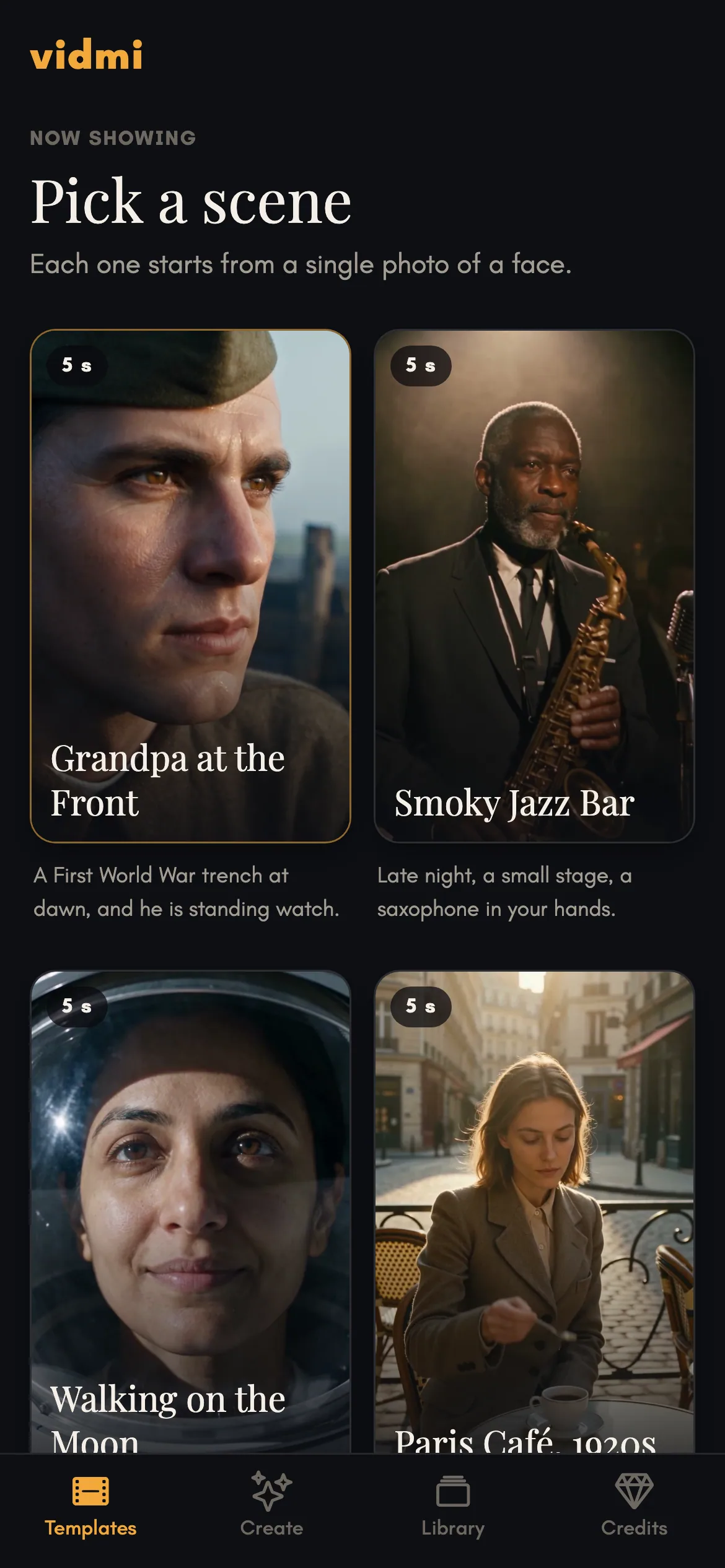
Each one has a sample film. Add one photo of a face and star in it.
Prompts to copy.
Copy one, open vidmi and paste it into “Describe your scene” on the Create tab. If a scene is already chosen there, tap “Write my own instead” first. Then add a photo.
- 01
Covered bridge
Me walking out of a covered bridge into bright fall light, red leaves blowing across the road, turning to look back.
- 02
Snowy mailbox
My mom as a mail carrier on a snowy country lane, closing a red mailbox and looking up as the snow starts to fall.
The useful question about any free AI video generator is where the free part stops. Here is the answer for vidmi, before you download anything.
vidmi is free to try on iPhone, with no account and no purchase to start. The app’s own line is “Try it free: 480p, 3 s on Fast.”
It is not unlimited, and it is not free forever. Once the free try is used, each video takes credits that you buy in the app as one-time purchases. There is no subscription.
Two more things to know now. vidmi works from one photo of a face, and every video, free or paid, carries a small vidmi mark in the corner.
Free, paid, and not offered
Three short lists, so you can check the offer against what you came for.
Free
- One real video. It is made from your photo and your scene, and you find it in your Library with a “free” label on it.
- Any scene. A ready-made one, such as Walking on the Moon or Smoky Jazz Bar, or a sentence of your own.
- The shape and the sound. Vertical, wide or square. With voices, with the sounds of the scene only, or silent.
- A look before you commit. “Preview the scene” shows, in words, what the video will show.
- Another go if it fails. If a video does not come out, the app says “Your free render is back.”
Paid, with credits
- Quality and Max. The free try runs on Fast, the quickest of the three models.
- Longer and sharper. Anything over 3 seconds or above 480p.
- The reference switch. “Use this video as reference” is not part of a free video.
Not offered, free or paid
- A free plan with no end. The free try is there so you can see your own face in a scene before you pay.
- A video without the mark. There is no option to remove it.
- A browser version. vidmi is an iPhone app.
The help page on what a free video includes keeps the same facts in one place.
Is this the AI video generator you were looking for?
“AI video generator” covers many different tools. Check the fit before you spend a download on it.
vidmi makes one kind of video: a short one, 3 to 10 seconds long, starring the face from one photo, in a ready-made scene or in one you describe. The free try is the 3 second version of that.
It does not make a video from words alone. There is no video upload, no editing timeline, no captions and no music library. One photo and one face go into each video.
If that is what you want, the free try shows it to you with your own face. The AI video generator page covers everything vidmi makes, and the AI video generator app for iPhone shows what is inside.
Use the free try as a test
Treat the free try as a test with one question: do you like seeing this face in this kind of scene? Three seconds can answer that. It does not tell you what Quality, Max or 1080p add, so do not judge those from it.
Use the photo you would use for real. The app asks for one clear face in good light, with no sunglasses and nobody else in the frame. If you have a few candidates, run them through the five-point check in how to choose the best photo.
Test the scene you actually want. A throwaway scene tells you little. If the Moon is why you came, pick Walking on the Moon: “Grey dust under your boots, the Earth above the horizon.”
Know what the sample films are, though. They run 5 seconds, and the Moon and jazz bar samples were made with Max. Your free video is the 3 second, 480p version on Fast.
Writing your own? Ask for one small action. Three seconds is a turn of the head or a single step. The two prompts on this page are sized for it: a walk out of a covered bridge that ends in a look back, and a mail carrier closing a mailbox as the snow starts.
Preview before you tap the button. If the app answers “Let’s try a different idea”, it adds “You haven’t been charged.” Change a few words and preview again.
After the free try, paying is your choice
Nothing happens by itself when the free try is used. No charge is made and no plan starts. The main button changes to “Get credits · N needed”, and that is all.
If you want more videos, you buy credits in the app. They come in packs through Apple’s in-app purchase, and each pack is a one-time purchase. Nothing renews, and there is nothing to cancel. The page on an AI video generator with no subscription walks through it.
You always see the cost first. With credits in your balance, the main button reads “Make my video · N credits” before you tap. This page gives no prices because the app shows them, and pricing explains what makes a video use more or fewer credits.
No account, so save what you make
There is no email to give, no password to set and no sign-in screen. vidmi does not ask for your name or phone number either.
If you are new and have no credits, the app puts you on the free video by itself. The main button says “Make my free video”, and that tap is all it takes.
The trade is simple. With no account, your free try, your credits and your Library belong to the app on that iPhone. Save the videos you care about to Photos. More on that in an AI video generator with no sign-up.
Questions
Is there a free AI video generator that asks for nothing up front?
vidmi asks for no account and no purchase to start. What it does need is an iPhone and one photo of a face. The free try is 480p and 3 seconds on Fast, and after it you use credits.
Is this a free trial that turns into a paid plan?
No. There is no plan to turn into and nothing that renews. You can make an AI video free to see what the app does, and you pay only if you later choose to buy credits.
Is it a free AI video app or a website?
An app, for iPhone only. Nothing is made on this website, and Android is coming soon.
Is it a free AI video maker for any kind of video?
No. It makes one kind, a short video starring the face in one photo, in a ready-made scene or one you describe. It does not make a video from text alone, and it has no editing timeline, captions or music library.
Can I save and share a free video?
Yes. It lands in your Library marked "free". "Share" opens the iPhone share sheet and "Save to Photos" puts it in your camera roll, the same as any other video.